When using an external (Windows) keyboard with your Mac you probably want to modify your keyboard layout, for instance change Windows button to Option and Alt button to Command.
A nice program for this is KeyRemap4MacBook, but that is not what this article is about, since there is a lot of information about that program already on the web.
My issue is that I switch a lot between the laptop keyboard and the external keyboard, depending on if I sit by my desk or not. There is a nice thing i KeyRemap4MacBook to switch profiles. However I do not want to manually switch profiles every time I (dis-)connect my external keyboard.
So I created a bash script that detects if an external keyboard is connected and then I schedule this with crontab.
The script:
#!/bin/bash
externalConnected=`/usr/sbin/system_profiler SPUSBDataType|grep -i keyboard|grep -vi internal`
if [[ "" == "$externalConnected" ]]; then
newSetting=1
else
newSetting=0
fi
currentSetting=`/usr/libexec/PlistBuddy -c "Print :selectedIndex" ~/Library/Preferences/org.pqrs.KeyRemap4MacBook.plist`
if [[ $newSetting != $currentSetting ]]; then
/usr/libexec/PlistBuddy -c "Set :selectedIndex $newSetting" ~/Library/Preferences/org.pqrs.KeyRemap4MacBook.plist
killall KeyRemap4MacBook
fi
This assumes that you have two profiles in KeyRemap4MacBook and that the first one is the profile for the external keyboard!
Crontab:
* * * * * ~/Scripts/detect_external_keyboard.sh
* * * * * sleep 15; ~/Scripts/detect_external_keyboard.sh
* * * * * sleep 30; ~/Scripts/detect_external_keyboard.sh
* * * * * sleep 45; ~/Scripts/detect_external_keyboard.sh
As you see I had to add 4 rows to make it run more often than once per minute.
måndag 22 april 2013

tisdag 26 februari 2013
CopyQ
Found this today, CopyQ, seems like a great clipboard manager. Let's see if it beats ClipIt.
 URLs:
URLs:
- https://github.com/hluk/CopyQ#readme
- http://www.webupd8.org/2013/02/copyq-interesting-clipboard-manager.html
torsdag 21 februari 2013
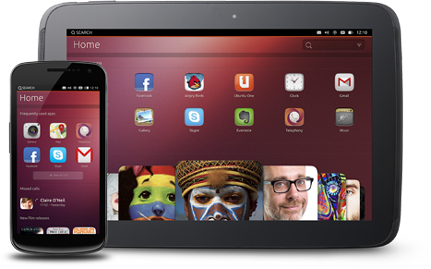
Ubuntu Phone
Tried Ubuntu Phone today on my Galaxy Nexus. Slick interface. Let's hope they get all functiality working eventually.
See more here: https://wiki.ubuntu.com/Touch
See more here: https://wiki.ubuntu.com/Touch
tisdag 19 februari 2013
Massive photo tagging
Use exiftool!
sudo apt-get install libimage-exiftool-perl
~/Pictures/2012> exiftool -keywords+=2012 -overwrite_original -q *
This will tag all photos under current folder, recursively, with the tag 2012.

sudo apt-get install libimage-exiftool-perl
~/Pictures/2012> exiftool -keywords+=2012 -overwrite_original -q *
This will tag all photos under current folder, recursively, with the tag 2012.

måndag 11 februari 2013
Disable Unity Spread
The Spread function is lagging on my laptop and I have, for a long time, tried to find a way to disable it.
Now I have to search no more! Unity Tweak Tool to the rescue.

Open the program, then goto Window management -> Window spread -> Disable.
Spread is used when you click the app icon in the launcher and there are (at least) two available windows for that app.
Installation instructions on Lifehacker.
Now I have to search no more! Unity Tweak Tool to the rescue.

Open the program, then goto Window management -> Window spread -> Disable.
Spread is used when you click the app icon in the launcher and there are (at least) two available windows for that app.
Installation instructions on Lifehacker.
måndag 4 februari 2013
Faster photo viewer
Not sure why they use Gnome Image Viewer as the default image viewer in Ubuntu. I prefer gThumb, which is a lot faster.

Simply open up All Settings -> Details -> Default Applications and select your favorite image viewer there.

Simply open up All Settings -> Details -> Default Applications and select your favorite image viewer there.
tisdag 29 januari 2013
Automatic mute when unplugged

- Install pavucontrol
- Open PulseAudio Volume Control
- Go to Output Devices
- Choose Speakers under Port
- Click the mute button
Prenumerera på:
Inlägg (Atom)